
If you need to resize photos of your salon so that they can be uploaded to Connect, it's likely that you have a programme to do this already installed on your computer.
Alternatively, there are also a number of free online photo editing software that you can use to resize, crop and edit photos.
Remember, the original file size needs to be large enough to retain a high resolution: 1920 x 1280 pixels minimum.
Using a Mac:
Preview comes installed on all Mac computers and is easy to use:
Find the image on your computer
Right-click, and select "Open with" and then "Preview"
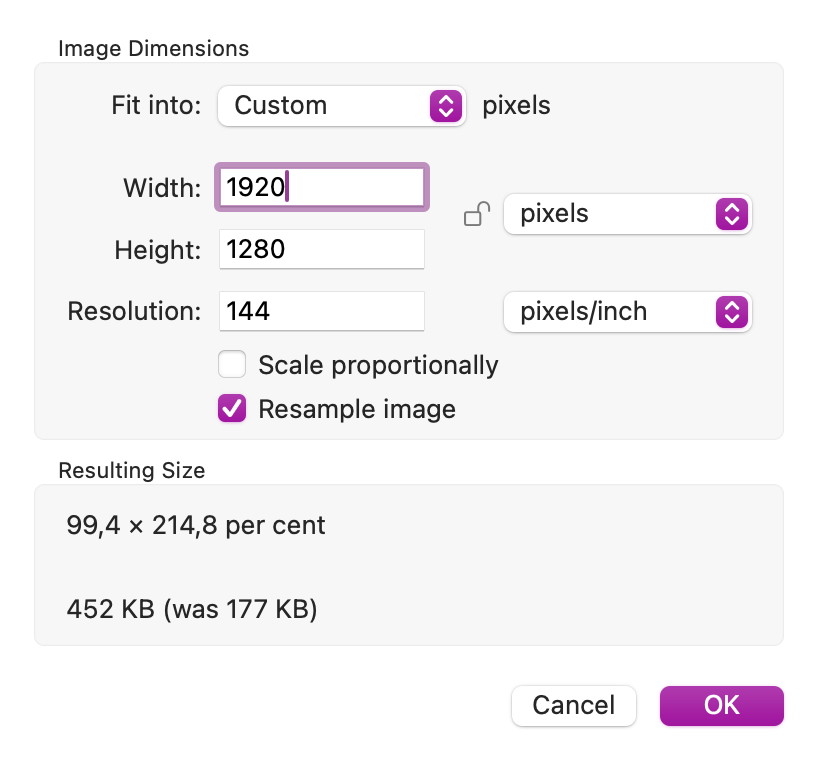
Click on "Tools"
Make sure you have "pixels" selected in the drop-down menu
Connect requires your photos to be at least 1920 x 1280 px
Click "OK"
Using a Windows computer:
Paint can open a wide range of file types and has a very simple way of resizing images:
In Paint, click "File" and "Open", then select your photo
On the Home tab of the Paint toolbar, click the “Resize” button
In the box that opens, select to resize by pixels
Connect requires your photos to be at least 1920 x 1280 px
Click "OK"
Was this article helpful?